





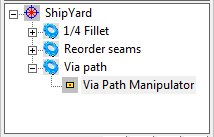


Main Screen/Master Typology Tree
Master Typology Tree on the
Main Screen
1.
Select Master Typology  and choose
Refresh on the mouse right click menu.
2.
Select Project on the programming Tree.
3.
Select Set Master Topology on the mouse
right click menu.
4.
Select the Master Typology.
5.
Execute the Master Typology by double
clicking on MT or choose Execute on
the mouse right menu.
6.
The Master Typology execution indicator
is running and the
program will be build step by step on the
Programming Tree.
7.
Click on button to stop the Master
Typology execution.
8.
You can re-run any individual process by
double clicking on the process .
and choose
Refresh on the mouse right click menu.
2.
Select Project on the programming Tree.
3.
Select Set Master Topology on the mouse
right click menu.
4.
Select the Master Typology.
5.
Execute the Master Typology by double
clicking on MT or choose Execute on
the mouse right menu.
6.
The Master Typology execution indicator
is running and the
program will be build step by step on the
Programming Tree.
7.
Click on button to stop the Master
Typology execution.
8.
You can re-run any individual process by
double clicking on the process .
and choose
Refresh on the mouse right click menu.
2.
Select Project on the programming Tree.
3.
Select Set Master Topology on the mouse
right click menu.
4.
Select the Master Typology.
5.
Execute the Master Typology by double
clicking on MT or choose Execute on
the mouse right menu.
6.
The Master Typology execution indicator
is running and the
program will be build step by step on the
Programming Tree.
7.
Click on button to stop the Master
Typology execution.
8.
You can re-run any individual process by
double clicking on the process .