




Main Screen/Programming Tree
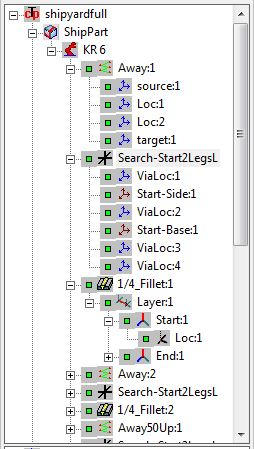
Programming Tree
1.
 - Project. Use the mouse right menu
to choose Project options. Use Insert
Model in order to add models to the
Project.
2.
- Model. Use the mouse right menu to
choose Model options.
3.
- Robot. Use the mouse right menu to
choose Robot options.
4.
- Via_path. - Via_Path Location.
Use the mouse right menu to choose
Via_Path options
5.
- Search. Via_Path Location. Use
the mouse right menu to choose Search or
Via_Path Location options.
6.
- Seam. - Layer. - Location.
Use the mouse right menu to choose
Seam, Layer or Location options.
7.
- Indicate well taught component.
8.
- Warning about some kind of
teaching problem with part or all
component elements.
9.
- Indicate failed teaching.
.
- Project. Use the mouse right menu
to choose Project options. Use Insert
Model in order to add models to the
Project.
2.
- Model. Use the mouse right menu to
choose Model options.
3.
- Robot. Use the mouse right menu to
choose Robot options.
4.
- Via_path. - Via_Path Location.
Use the mouse right menu to choose
Via_Path options
5.
- Search. Via_Path Location. Use
the mouse right menu to choose Search or
Via_Path Location options.
6.
- Seam. - Layer. - Location.
Use the mouse right menu to choose
Seam, Layer or Location options.
7.
- Indicate well taught component.
8.
- Warning about some kind of
teaching problem with part or all
component elements.
9.
- Indicate failed teaching.
.
- Project. Use the mouse right menu
to choose Project options. Use Insert
Model in order to add models to the
Project.
2.
- Model. Use the mouse right menu to
choose Model options.
3.
- Robot. Use the mouse right menu to
choose Robot options.
4.
- Via_path. - Via_Path Location.
Use the mouse right menu to choose
Via_Path options
5.
- Search. Via_Path Location. Use
the mouse right menu to choose Search or
Via_Path Location options.
6.
- Seam. - Layer. - Location.
Use the mouse right menu to choose
Seam, Layer or Location options.
7.
- Indicate well taught component.
8.
- Warning about some kind of
teaching problem with part or all
component elements.
9.
- Indicate failed teaching.
.